Description
CareWatch Wireless Alarm Main System (MATW-S2)
Hardware Features
Uses LoRa (Long Range) technology for long-distance wireless communication with low power consumption.
The main unit supports one-to-many device connections and can be expanded as needed.
This system can flexibly integrate with bed sensors, chair sensors, floor mats, and nurse call buttons to meet caregiving needs.
Software Features
Information Display:
Three simple main interface options: Settings, Records, and Buttons.
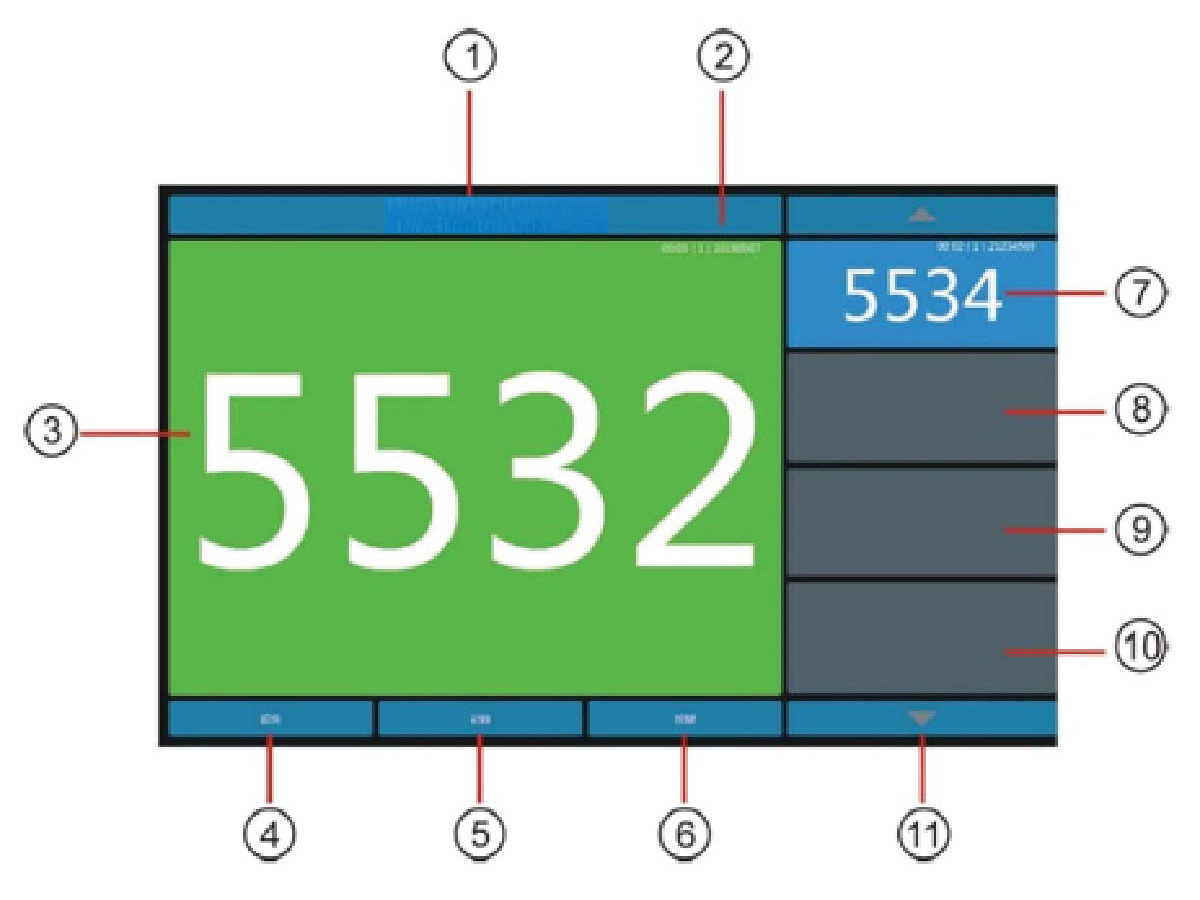
Alarm display on the home screen, capable of showing multiple alarms simultaneously, with the earliest alarm displayed in a large window.
Touchscreen functionality allows direct selection to dismiss alarms or access other functions.
Easy Configuration:
Device names can be adjusted according to institutional needs.
Alarm sound options can be customized, such as continuous alarms or single-tone alarms.
Various alarm cancellation methods can be set, including direct touchscreen dismissal, touchscreen dismissal with password entry, or double-button press cancellation.
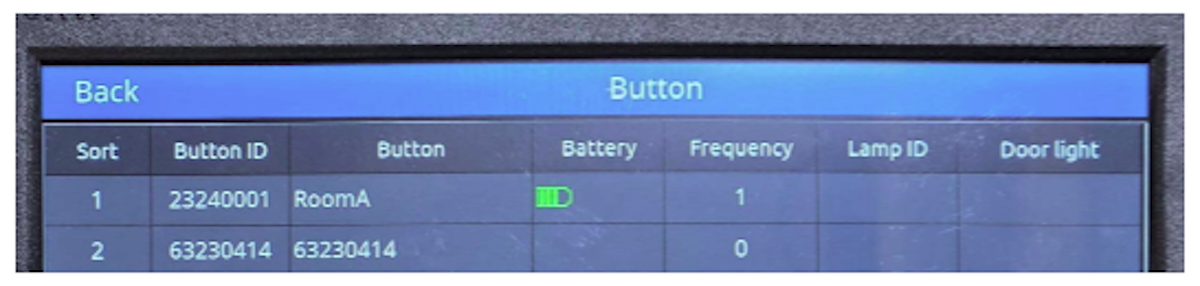
Button Information:
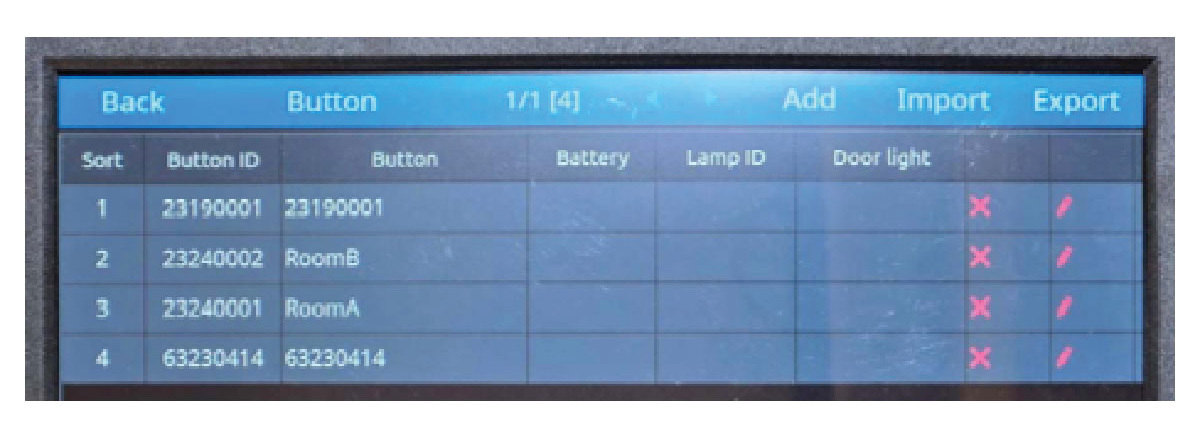
Button settings can be added or removed as needed.
Displays button battery level for convenient charging management. Shows call frequency for each button (e.g., bed number) for easy monitoring.
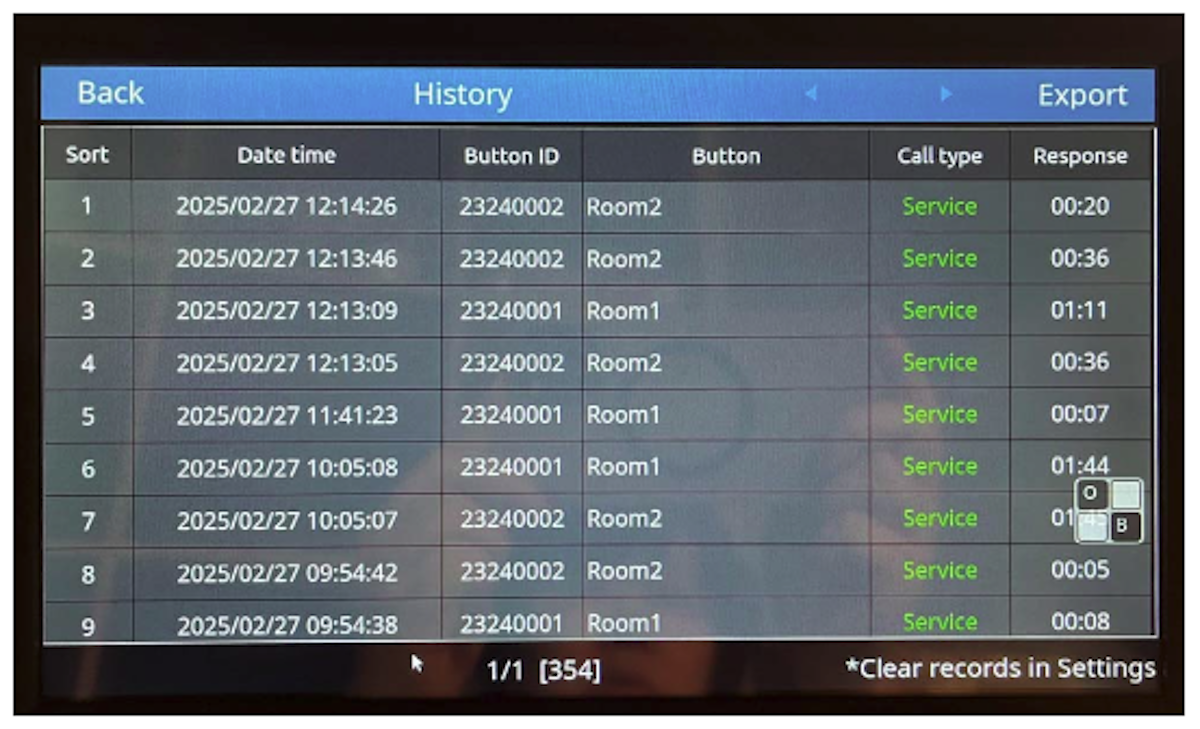
Comprehensive Records:
Stores up to 5,000 records.
Records include call time, button ID, button name,
and alarm waiting time.
Allows for retrospective review and data export.
Data export interfaces: RS232, USB, etc.
Add-on Items Specification
1. S2 Receiver Host
Features: 10.1" touch screen
Power: AC 100~240V
Dimensions: 25 x 16.5 x 2.5 cm
2. WB100 Transmitter
Features: IP67 waterproof and dustproof
Power: DC 5V magnetic contact charging
Dimensions: 6 x 6 x 2 cm
3. Chair Pad
Material: PVC with cable
connected with WB100 transmitter
Size: 30 x 30cm
4. Bed Pad
Material: PVC with cable
connected with WB100 transmitter
Size: 75.5 x 30 cm
5. Floor Mat
Material: PVC with cable
connected with WB100 transmitter
Size: 78 x 54 cm
*chair/bed pads and floor mats can be used alone or in combination, depending on the users’ needs
Accessories
S2 host package includes:
S2 receiver host ×1
Host stand ×1
Wall mount for host ×1
Enhanced antenna ×1
Host charging cable ×1
Magnetic charging cables for transmitter ×4
1‐to‐4 charging adapter ×1
Button label stickers ×1
Operation Interface
1. Unit name: Customizable (Hospital name or Care Center name...)
2. Call message: Displays wait time, call count, and button ID
3. Room number: Shows the earliest call in main window
4. Settings: System settings access
5. Records: Call history
6. Buttons: View registered buttons and low battery status
7. Room display (call order 2)
8. Room display (call order 3)
9. Room display (call order 4)
10.Room display (call order 5)
11.Scroll buttons for record lookup
Note: Clicking the transmitter number on the host screen cancels the call.
Setting
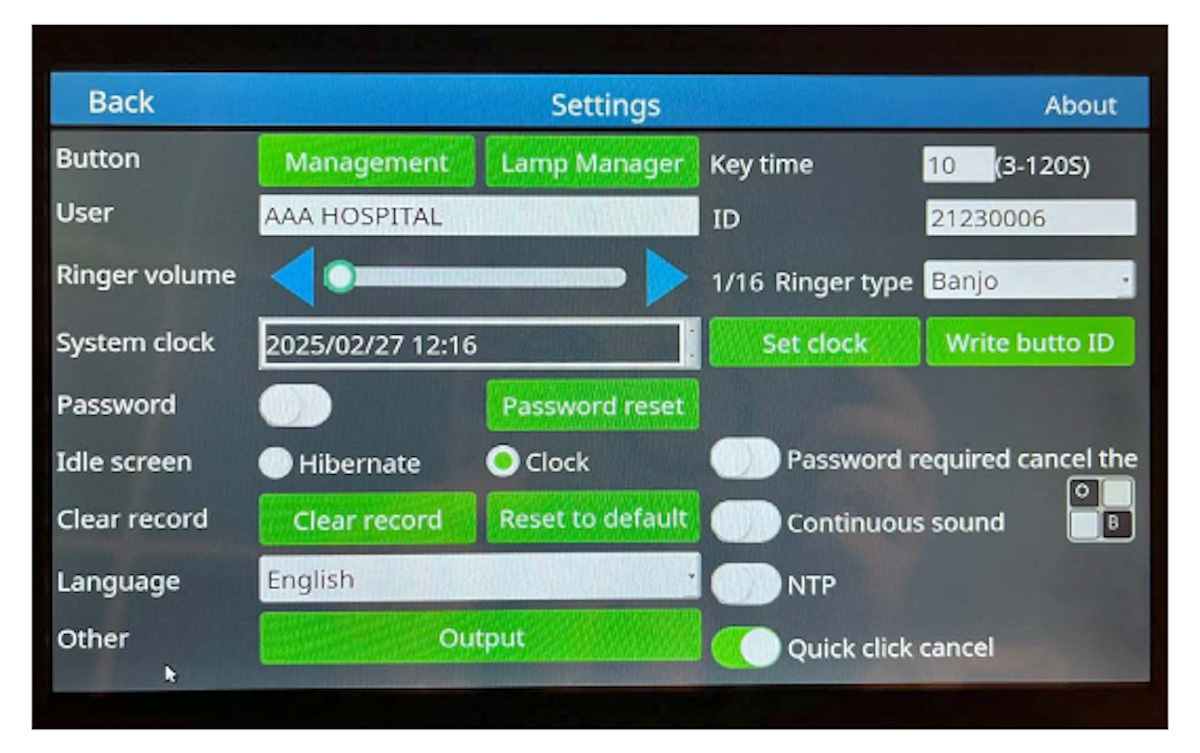
Button Management: Add, delete, or edit buttons
Unit Name: Enter unit/department name
Ringtone Volume: Adjust call alert volume
System Time: Set in YYYY/MM/DD HH:MM format
Password Protection: (No default password)
- Enabled: Password required for deleting/editing buttons, door lights,
and records
- Disabled: No password required
- Reset Password: Change current password
Standby Screen:
a. Black screen
b. Clock display (used as screensaver)
Clear Records:
a. Clear ringer records
b. Restore factory settings (both require password)
Language: Supports Simplified Chinese / Traditional Chinese / English
Other Settings: Output configuration (consult your network provider)
Button Timeout: Configurable from 3–120 seconds
Ringtone Types: 14 available
Require Password to Cancel Call: Enable to require password every time
Continuous Sound Alert: Ring continues until call is canceled
NTP (Network Time Protocol)
Double-press to Cancel Call: Enable to cancel call by pressing button twice
Button Management
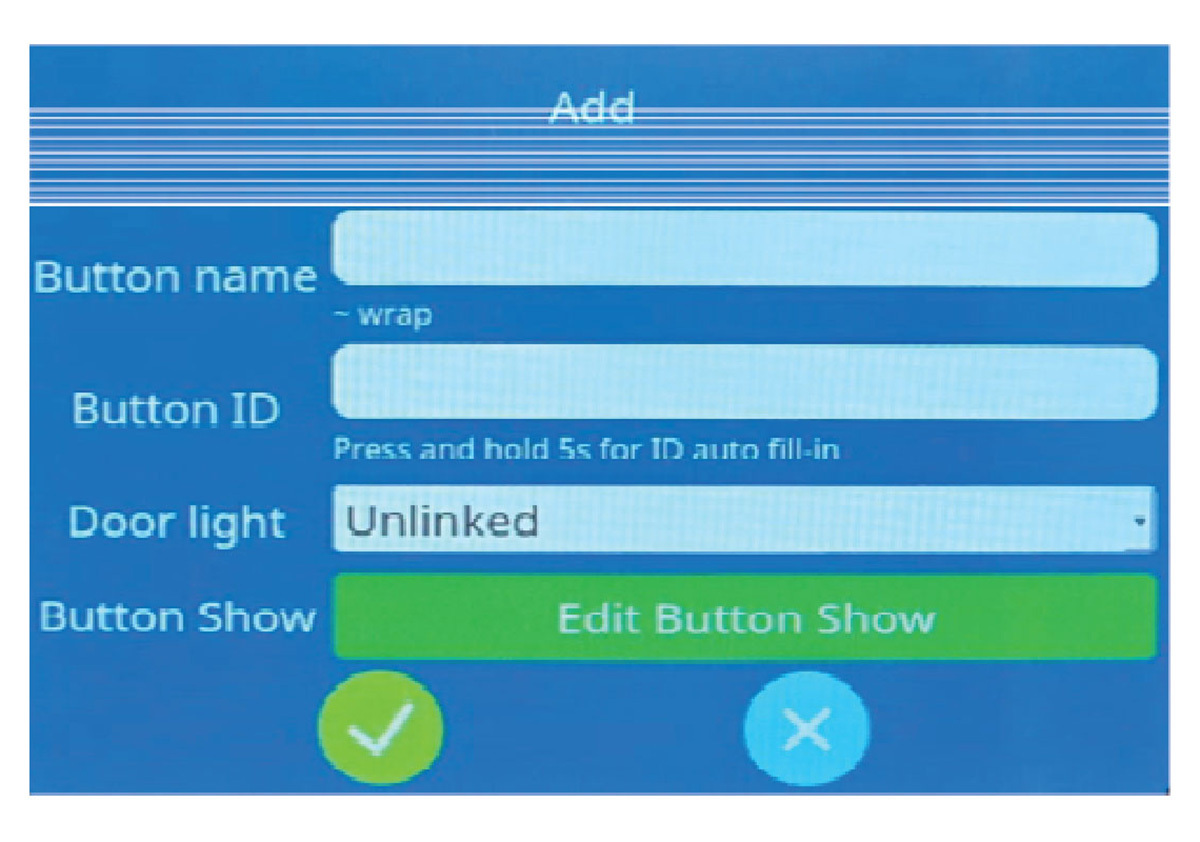
1. Add New: Register a new button
2. Button Name: Customizable (e.g., “VIP Room 101”) – displayed on host when called
3. Button ID Input:
a. Manually enter 8‐digit button number
b. Press and hold any button for 5 seconds to auto‐fill ID
4. Door Light Management: Option to link/unlink to existing door light
5. Button Type: Single‐function WB100
6. Post‐Registration Info Display:
Note: If call count = 0, date shown is the registration date.
7. Edit: Select a button to change name
8. Delete: Select a button to remove registration
9. Search: Search by button ID or name
Records
1. Call Logs: Include date/time, button ID, name, call type(call),and response time
2. Delete Logs: Stores the latest 5000 entries; clear logs via settings
Important Notes
1. Do not place the host in extremely cold (below 0°C / 30°F) or hot (above 50°C / 122°F) environments, as this may prevent proper startup.
2. Avoid exposing the host or door light to water or moisture. Rain, humidity, or liquid minerals can corrode electronic circuits.
3. Do not attempt to disassemble the device. Unauthorized disassembly may cause malfunction and void the warranty.
4. Immediately power off and contact service if:
a. Power cable is damaged or worn
b. Liquid spills on the host
c. Host is dropped and casing is damaged